
- @ClassName:UserService
- @Description:测试服务接口类
- include:两个测试方法
- @author Jerry
- @date:2018年4月10日下午3:58:10[br/>*/
//@WebService(targetNamespace="http://service.demo.example.com")如果不添加的话,动态调用invoke的时候,会报找不到接口内的方法,具体原因未知.
@WebService(targetNamespace="](mailto:br/)[http://service.demo.example.com]( )")
public interface UserService {
@WebMethod//标注该方法为webservice暴露的方法,用于向外公布,它修饰的方法是webservice方法,去掉也没影响的,类似一个注释信息。
public User getUser(@WebParam(name = "userId") String userId);
@WebMethod[br/>@WebResult(name="String",targetNamespace="")
public String getUserName(@WebParam(name = "userId") String userId);](mailto:br/)
}**
3.3 服务接口的实现类
package com.example.demo.service.impl;
import java.util.HashMap;
import java.util.Map;
import java.util.UUID;
import javax.jws.WebService;
import org.springframework.stereotype.Component;
import com.example.demo.entity.User;
import com.example.demo.service.UserService;
/
- @ClassName:UserServiceImpl
- @Description:测试服务接口实现类
- @author Jerry
- @date:2018年4月10日下午3:58:58[br/>*/
@WebService(serviceName="UserService",//对外发布的服务名
targetNamespace="](mailto:br/)[http://service.demo.example.com",//指定你想要的名称空间,通常使用使用包名反转]( )
endpointInterface="com.example.demo.service.UserService")//服务接口全路径, 指定做SEI(Service EndPoint Interface)服务端点接口[br/>@Component
public class UserServiceImpl implements UserService{](mailto:br/)
private Map<String, User> userMap = new HashMap<String, User>();
public UserServiceImpl() {
System.out.println("向实体类插入数据");
User user = new User();
user.setUserId(UUID.randomUUID().toString().replace("-", ""));[](mailto:br/)user.setEmail("Jerry@163.xom");
br/>user.setUserName("test1");
user.setEmail("Jerry@163.xom");
userMap.put(user.getUserId(), user);
user = new User();
user.setUserId(UUID.randomUUID().toString().replace("-", ""));
user.setUserName("test2");
user.setEmail("Jerryfix@163.xom");
userMap.put(user.getUserId(), user);
user = new User();
user.setUserId(UUID.randomUUID().toString().replace("-", ""));
user.s
《一线大厂Java面试题解析+后端开发学习笔记+最新架构讲解视频+实战项目源码讲义》
【docs.qq.com/doc/DSmxTbFJ1cmN1R2dB】 完整内容开源分享
etUserName(“test3”);
user.setEmail("Jerryfix@163.xom");
userMap.put(user.getUserId(), user);
}[br/>@Override
public String getUserName(String userId) {
return "userId为:" + userId;](mailto:br/)[br/>}
@Override
public User getUser(String userId) {
System.out.println("userMap是:"+userMap);
return userMap.get(userId);
}](mailto:br/)
}****
3.4 发布webService的配置
package com.example.demo.config;
import javax.xml.ws.Endpoint;
import org.apache.cxf.Bus;
import org.apache.cxf.jaxws.EndpointImpl;
import org.apache.cxf.transport.servlet.CXFServlet;
import org.springframework.beans.factory.annotation.Autowired;
import org.springframework.boot.web.servlet.ServletRegistrationBean;
import org.springframework.context.annotation.Bean;
import org.springframework.context.annotation.Configuration;
import com.example.demo.service.UserService;
/**
- @ClassName:CxfConfig
- @Description:cxf发布webservice配置
- @author Jerry
- @date:2018年4月10日下午4:12:24[br/>*/
@Configuration
public class CxfConfig {](mailto:br/)[br/>@Autowired
private Bus bus;](mailto:br/)
@Autowired
UserService userService;
/\*\*
* 此方法作用是改变项目中服务名的前缀名,此处127.0.0.1或者localhost不能访问时,请使用ipconfig查看本机ip来访问
* 此方法被注释后:wsdl访问地址为http://127.0.0.1:8080/services/user?wsdl
* 去掉注释后:wsdl访问地址为:[http://127.0.0.1:8080/soap/user?wsdl]( )
* @return[br/>\*/
@SuppressWarnings("all")
@Bean
public ServletRegistrationBean dispatcherServlet() {
return new ServletRegistrationBean(new CXFServlet(), "/soap/\*");
}](mailto:br/)
/\*\* JAX-WS
* 站点服务
* \*\*/[br/>@Bean
public Endpoint endpoint() {
EndpointImpl endpoint = new EndpointImpl(bus, userService);
endpoint.publish("/user");
return endpoint;
}](mailto:br/)
}
4. 项目启动后的wsdl信息
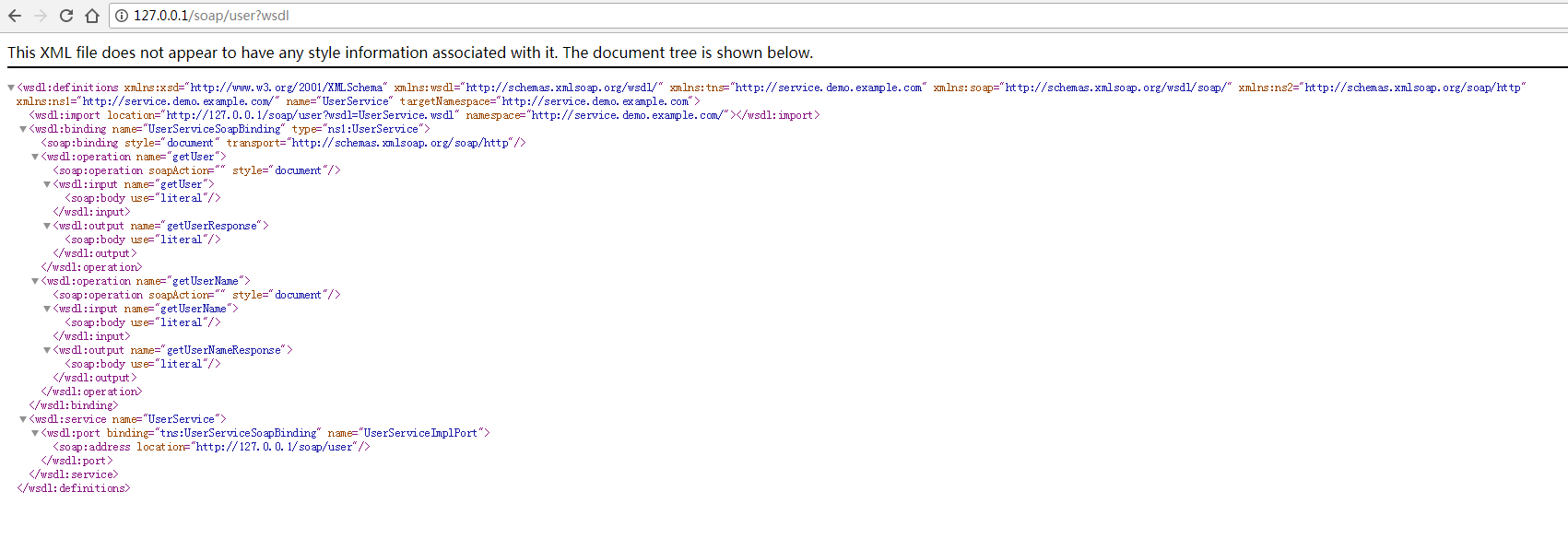
由于图省事,我将项目的服务端口改为了80,这样就省去了IP后面写端口号的麻烦。
5. 两种调用方式
package com.example.demo.client;
import org.apache.cxf.endpoint.Client;
import org.apache.cxf.jaxws.JaxWsProxyFactoryBean;
import org.apache.cxf.jaxws.endpoint.dynamic.JaxWsDynamicClientFactory;
import com.example.demo.service.UserService;
/**
- @ClassName:CxfClient
- @Description:webservice客户端:
- 该类提供两种不同的方式来调用webservice服务
- 1:代理工厂方式
- 2:动态调用webservice
- @author Jerry
- @date:2018年4月10日下午4:14:07
\*/
public class CxfClient {
public static void main(String\[\] args) {
CxfClient.main1();
CxfClient.main2();
}
/\*\*
* 1.代理类工厂的方式,需要拿到对方的接口地址
\*/
public static void main1() {
try {
// 接口地址
String address = "[http://127.0.0.1/soap/user?wsdl]( )";
// 代理工厂
JaxWsProxyFactoryBean jaxWsProxyFactoryBean = new JaxWsProxyFactoryBean();
// 设置代理地址
jaxWsProxyFactoryBean.setAddress(address);
// 设置接口类型
jaxWsProxyFactoryBean.setServiceClass(UserService.class);
// 创建一个代理接口实现
UserService us = (UserService) jaxWsProxyFactoryBean.create();
// 数据准备
String userId = "maple";
// 调用代理接口的方法调用并返回结果
String result = us.getUserName(userId);
System.out.println("返回结果:" + result);
} catch (Exception e) {
e.printStackTrace();
}
}
/\*\*
* 2:动态调用
\*/
// 数据准备
String userId = "maple";
// 调用代理接口的方法调用并返回结果
String result = us.getUserName(userId);
System.out.println("返回结果:" + result);
} catch (Exception e) {
e.printStackTrace();
}
}
/\*\*
* 2:动态调用
\*/

